
Remodel AI - Home Renovation
ReImage AI Inc.Art & Design
4.4626.00 Reviews
- Version
- 1.6.3+20260825T113724.9c81c2c9.c59e690c
- Installs
- 1.00M
- Age Rating
- Everyone
Screenshots


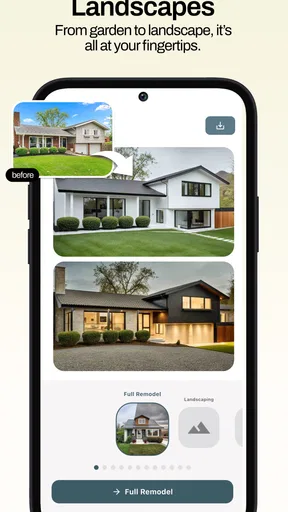


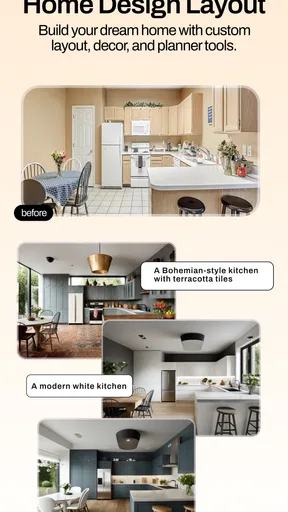
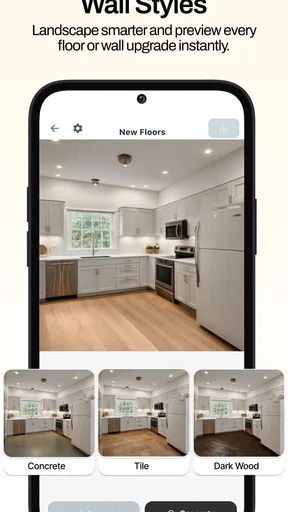
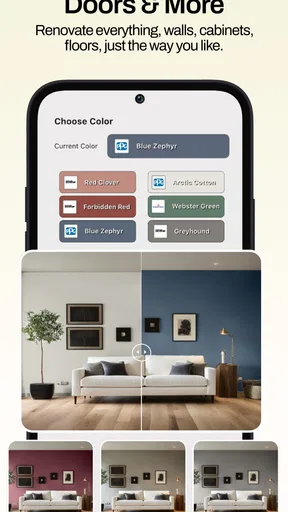
Our Review of Remodel AI - Home Renovation
 Analysis by Appyee
When I want to explore a change to a room before buying paint or moving furniture, I find it helpful to see a visual idea rather than rely on a vague picture in my head. Remodel AI - Home Renovation is aimed at that early, exploratory stage: it uses AI to help you imagine changes to interiors and home exteriors. I’d treat it as a source of concepts, not a substitute for a contractor, a measured floor plan, or a firm renovation quote.
What free access means in practice
The app is free to install, with in-app purchases priced from $4.99 to $89.99 per item. That makes it easy to try before deciding whether any paid option is worthwhile, but the range is wide enough that I would check the purchase details in the app before spending. I wouldn’t assume that every feature or every amount of use is included at no cost.
For someone who only wants to test a few design directions, free access may be enough to decide whether this kind of AI visualization suits them. If you plan to use it repeatedly across several rooms or through a longer renovation, the paid options may matter more. The right question is not simply whether the app is free, but whether the specific tools you need are available on terms you’re comfortable with.
Useful as a visual starting point, not a renovation plan
The strongest reason to try the app is the speed of turning a room photo into a visual prompt for ideas. Instead of collecting inspiration images that may not resemble your own space, you can begin with the room you actually have and consider possible directions for it. That can be useful when you and a partner have different ideas, or when you know a room feels dated but can’t name what you want to change.
I’d use the results to narrow choices—such as whether to aim for a lighter, calmer look or a more dramatic one—then make real-world decisions separately. A generated image can help you discuss style, but it should not be treated as proof that furniture will fit, a wall can be removed, or a material will look exactly that way in your lighting. Use the images to ask better questions, not to approve construction work.
Who is likely to get the most from it
It is a natural fit for renters planning reversible updates, homeowners at the idea-gathering stage, and DIYers who want a quick way to compare visual directions. It may also help anyone preparing to speak with a designer: a few images can make it easier to explain what feels right and what does not. The app is rated for Everyone, and ReImage AI Inc. is the developer behind it.
I’d be more cautious if you need exact dimensions, professional architectural drawings, reliable material quantities, or a binding labor estimate. In those cases, a design professional, a measuring tool, or a contractor’s assessment is the more appropriate next step. An AI concept can start a conversation, but it cannot inspect wiring, identify structural problems, or account for every constraint in a real building.
A practical way to test ideas without wasting time
For a useful first try, take a clear photo from a position that shows the room’s main features, then choose one design question to explore at a time. For example, if you are unsure about the overall mood, keep the question broad and compare style directions. If you already know the mood you want, focus your attention on the parts of the image that help communicate that choice. This makes it easier to judge whether a result is genuinely useful instead of simply eye-catching.
A small but important trade-off is that a photo is only a snapshot. Objects can obscure corners, mirrors and windows can confuse the visual read, and the camera angle may make proportions look different from how they feel in person. I would take more than one photo when a room has an awkward layout, and I would keep the original image nearby when comparing concepts. That gives you a better chance of spotting what the AI has changed rather than assuming every detail reflects the actual room.
A realistic use case is a weekend living-room refresh. Before shopping, I could photograph the room, use the app to explore a few broad looks, and save the direction that feels closest to home. Then I’d check those ideas against existing furniture, natural light, storage needs, and measurements. If the concept suggests a large piece or a major alteration, I’d verify the fit and feasibility independently instead of treating the picture as a plan.
How it compares with familiar design tools
Compared with browsing image boards or general interior-design galleries, an AI room tool has a more personal starting point: your own space rather than someone else’s finished project. That can make it easier to picture a change in context. On the other hand, curated inspiration collections can be better when you want dependable examples of real materials and completed rooms, while manual room planners are usually the better choice when precise layout and dimensions matter.
I see Remodel AI as occupying the idea-generation space between those options. It can help you move from “I want the room to feel different” to a clearer visual preference, but it does not remove the need for practical planning. If your main goal is inspiration, that distinction is a strength. If your goal is a build-ready design, it is a limitation you should account for from the start.
The app sits in the Art & Design category and has an average rating of 4.6 from around 27,000 ratings, with more than 1 million installs. Those figures suggest that many people have tried it, but they cannot tell you whether its particular approach will match your taste or project. I’d use the free entry point to make that judgment for myself rather than treating popularity as a promise of results.
It was released on April 17, 2023, and its current version is 1.4.2+20260217T093227.fc47c641.3e07a067. It requires Android 7.0 or later. Those details are useful if you’re checking compatibility, especially on an older device, but they don’t change the central advice: judge it by whether its visual suggestions help you make decisions you were already struggling to make.
First Impressions and Setup
Jumping into Remodel AI - Home Renovation, the first thing you’ll notice is its sleek and intuitive design. Setting it up is a breeze. The app guides you through a user-friendly process to create an account, and within minutes, I was ready to explore its capabilities. The interface is clean, with everything neatly categorized, making navigation a piece of cake.
Features That Stand Out
One of the coolest features of this app is its ability to use AI to generate renovation ideas. You simply upload a picture of your room, and the app does its magic by suggesting styles and decor adjustments. It’s like having a personal interior designer right in your pocket! I uploaded a photo of my rather drab living room, and I was blown away by the creative suggestions.
Another handy tool is the 3D visualization. You can interact with a digital version of your space and play around with different layouts and furniture placements. It’s incredibly satisfying to see your ideas come to life in a virtual space before committing to any actual changes.
Planning and Budgeting Made Easy
No renovation project is complete without some serious planning and budgeting. With Remodel AI, you have access to detailed cost estimates for materials and labor. It breaks down expenses, helping you stay within your budget while still achieving your dream look. I found this feature particularly helpful as it saved me from those pesky renovation surprises that often creep up.
Community and Inspiration
Feeling stuck or in need of inspiration? The app connects you to a vibrant community of fellow renovators. You can browse through a plethora of user-submitted before-and-after photos. Seeing other people’s transformations is not only inspiring but also gives you a sense of what’s possible. I spent hours scrolling through these photos, and it really got my creative juices flowing.
Challenges and Learning Curve
While the app is mostly user-friendly, there’s a slight learning curve when it comes to mastering all its features. Especially when diving into advanced planning tools, you might need a bit of patience. But once you get the hang of it, the possibilities are endless. A little perseverance goes a long way, and the app’s built-in tutorials are quite helpful in this regard.
Another thing to keep in mind is that the AI suggestions are just that—suggestions. Sometimes, they might not perfectly align with your personal style or the structural realities of your space. But hey, it’s always good to have options!
Why You’ll Love It
If you’re someone who loves to experiment with home design or if you’re planning a major renovation, this app is a game-changer. It combines the power of AI with practical tools to make the whole process smoother and more enjoyable. Plus, the community aspect adds a social dimension that’s both fun and encouraging.
So, if you’re ready to take your home renovation projects to the next level, give Remodel AI a try. Whether you’re a seasoned DIYer or a newbie looking to get started, this app has something to offer for everyone. Happy renovating!
Verdict
Strengths of Remodel AI - Home Renovation
- Easy-to-use interface for beginners.
- Wide range of design templates available.
- Real-time 3D visualization feature.
- High-quality rendering output.
- Seamless integration with smart devices.
Limitations of Remodel AI - Home Renovation
- Limited free version features.
- Requires a stable internet connection.
- Occasional app crashes reported.
- Some design tools lack precision.
- In-app purchases can be costly.
Similar Picks in This Category
View All
Canva: AI Photo & Video Editor
Canva4.8

PENUP – Drawing-sharing SNS
Samsung Electronics Co., Ltd.4.5

Crafto
Kutumb App4.6

Sketchbook
Sketchbook4.1

ibis Paint X
ibis inc.4.5

Adobe Express: AI Photo, Video
Adobe4.6
Frequently Asked Questions
What features does Remodel AI offer for home renovation?
Remodel AI provides a suite of features designed to assist with home renovation projects. It includes tools for 3D visualization, material selection, and project cost estimation. Users can upload photos of their space and experiment with different design elements to see how changes will look. Additionally, the app offers a library of design templates and expert tips.
Is Remodel AI suitable for both professionals and beginners?
Yes, Remodel AI is designed to cater to both professionals and beginners. For professionals, it offers advanced tools for detailed planning and visualization. Beginners benefit from its user-friendly interface and step-by-step guides, making it accessible for those with limited renovation experience. The app aims to simplify the renovation process for all users.
Does Remodel AI require an internet connection to function?
While some features of Remodel AI may work offline, an internet connection is generally required to access the full range of tools and updates. Cloud-based storage for projects and access to the latest design templates and materials typically need an online connection. Users should ensure they have reliable internet access for optimal app performance.
Are there any costs associated with using Remodel AI?
Remodel AI offers a free version with basic features, but users can opt for a premium subscription to unlock advanced tools and additional content. The premium version includes features like high-resolution renderings, exclusive design templates, and priority support. Pricing details can be found within the app or on the official website.
How does Remodel AI ensure the accuracy of its cost estimates?
Remodel AI uses a combination of user input and current market data to provide accurate cost estimates. Users enter specifics such as room dimensions and desired materials, and the app calculates potential costs based on real-time data. While it provides a helpful guideline, users should also consult professionals for precise budgeting.
